The ZimaBoard 2 is a single-board computer that TechPowerUp describes as “a rather strange piece of kit” and “more of a developer kit than anything else,” largely because it ships as a bare board with no chassis or housing. It is the successor to the original ZimaBoard, retaining the heatsink-as-enclosure design but in a sleeker form, and it targets tinkerers, hobbyists, and home lab enthusiasts rather than users seeking a polished, appliance-style NAS. The review unit was the 1664 configuration with 16 GB of RAM and 64 GB of eMMC storage, priced at $399 for the bare board, with a cheaper 832 SKU also available.
Hardware-wise, the board is powered by an Intel Processor N150, a quad-core Twin Lake chip with a boost clock up to 3.6 GHz, paired with soldered LPDDR5 memory and Forsee eMMC storage. Connectivity is a major strength: two 2.5 Gbps Ethernet ports using Intel i226-V controllers, two USB 3.1 Gen 1 Type-A ports, a PCIe 3.0 x4 slot, Mini DisplayPort 1.4, and two SATA 6 Gbps ports with a proprietary power connector. However, TechPowerUp notes several quirks: there is no power button (requiring unplugging to reboot after shutdown), the choice of Mini DisplayPort instead of USB-C is questionable, and the bundled 40 mm fan feels like a retrofit, with access to its header requiring Torx screws that broke the reviewer’s bit.
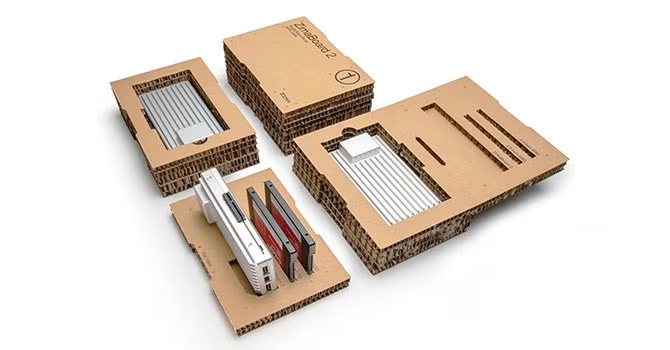
The review bundle, called the Mini NAS Kit, costs $519 excluding VAT and includes a mount for two 3.5-inch SATA drives, an NVMe to PCIe adapter card, a PCIe flex cable, a Micro DP to HDMI adapter, and Ethernet cables. Assembly is described as “quirky and messy”: the aluminium drive holder includes a bracket for the flex cable, but without it the drives slide around. The NVMe adapter alone is priced at $130, and a cheaper starter bundle at $449 swaps it for a simpler NVMe PCIe card. The physical integration is not as refined as a purpose-built NAS, reinforcing that this is a DIY platform.
Performance is capable but not powerful. Phoronix measured around 10 Watts under load with peaks of 14.5 Watts, and the passively cooled aluminium chassis becomes hot to the touch, making the 4-pin fan header worthwhile for sustained loads. Network performance is a highlight: CNX Software and INFO SPEED HARDWARE recorded approximately 6.84 Gbps aggregate throughput (about 855 MB/s before overhead), making the dual 2.5 GbE ports well-suited for a compact file server or backup target. Storage performance with SATA drives is adequate for a two-bay setup, though detailed NVMe benchmarks were not provided.
The board ships with ZimaOS, which TechPowerUp calls “quite modern and slick” but “pretty basic in terms of features.” A free version is available for other hardware, while the Plus version removes limitations on ZIMA hardware. CNX Software found ZimaOS supports SATA storage, SAMBA and SFTP file sharing, and basic NAS functions, though video playback in the web dashboard is inconsistent. Importantly, the x86 architecture allows users to replace ZimaOS with TrueNAS, Proxmox, Debian, Ubuntu Server, pfSense, OpenWrt, or even Windows, making it a versatile platform for experimentation rather than a locked-down appliance.
In the market, the ZimaBoard 2 is expensive compared to a Raspberry Pi 5 or Intel N100 mini PC, both of which offer similar or better performance for less. Its value lies in the integrated experience: passive cooling, dual 2.5 GbE, a PCIe slot, and SATA support in a single board. As DVHARDWARE summarised, “this might be the world’s smallest NAS, but it’s also not strictly a NAS, at least not until you invest in some optional accessories,” and the result “isn’t a favorable comparison against even the simplest NAS we’ve tested.” Yet for tinkerers, it offers flexibility that commercial NAS units lack.
Ultimately, the ZimaBoard 2 is a niche product for developers and home lab enthusiasts who enjoy assembling and customising their own solutions. It is not a plug-and-play NAS, and its quirks—no power button, awkward fan access, dated Mini DisplayPort, and basic OS features—will deter mainstream users. But for those who want a compact, low-power x86 server with dual 2.5 GbE and PCIe expandability, and who are willing to accept the trade-offs, it is a worthy consideration. As Phoronix concluded, it is “a nifty little SOHO server” for connecting a few drives or PCIe devices, provided you approach it as a project rather than a finished product.