Keychron has released its first docking station, the 14-in-1 Thunderbolt 5 model, which achieved a 4.5-star Recommended score and is priced at $349.99. This positions it competitively with Ugreen options in both feature set and cost.
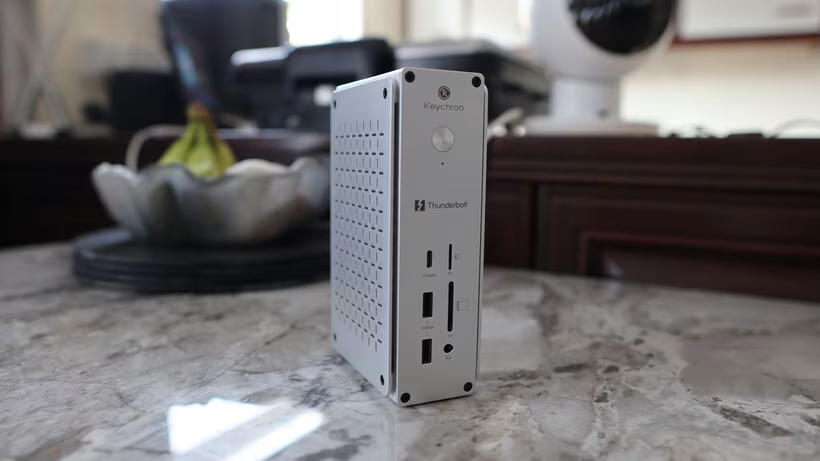
The dock features a compact and sturdy aluminum construction, notable for its unique cross-pattern design on the elevated side panels. These decorative elements serve dual functions by acting as passive cooling vents and integrating an aluminum heatspreader.
Despite its functionality, the unit is remarkably space-efficient. Weighing 856 grams and measuring a modest 165 x 98 x 53 millimeters, it stands upright on a desk like a miniature tower rather than sprawling horizontally, saving significant desktop real estate compared to rival docks.
Port placement is organized into distinct front and rear groupings. The front panel includes a power button with an indicator LED, a USB-C port providing 10Gbps throughput, two USB-A 10Gbps ports, separate SD and microSD card slots rated for UHS-II speeds up to 312Mbps, and a 3.5mm headphone jack.
The rear section houses the primary connectivity points: an upstream Thunderbolt 5 port capable of delivering up to 140W power delivery to the host laptop. It also features two downstream Thunderbolt 5 ports for high-speed external storage and displays. Additional connections include two full-size HDMI 2.1 ports, a 2.5-gigabit Ethernet port for wired networking, and two additional USB-A 10Gbps ports.
The entire system is powered by a substantial 180-watt power supply included with the purchase.
Performance testing revealed solid real-world capability. When connected to a 16-inch M1 Pro MacBook Pro, the dock successfully delivered fast charging and brisk display output at 4K/144Hz via HDMI 2.1.
However, the review noted limitations: an older Thunderbolt 4-only MacBook maxed out at 6K/60Hz, failing to reach the advertised 8K/60Hz possible with newer M4 or M5 Pro and Max models. Furthermore, initial display connectivity on macOS requires granting system permissions before full functionality can be achieved.
The abundance of ports proved highly practical for sustained use, accommodating various peripherals such as external SSDs, mechanical keyboards, camera SD cards, and wired Ethernet simultaneously without connection issues.
Key strengths highlighted include the genuinely compact footprint that conserves desk space, excellent build quality derived from machined aluminum construction, comprehensive connectivity spanning both modern Thunderbolt 5 and legacy USB-A options, fast USB and SD card readers that surpass those found in many new laptops, and reliable 140W power delivery.
The main drawbacks pointed out are the premium price point at the high end of the market. Critics also noted the absence of advanced features like onboard M.2 NVMe storage expansion seen on pricier competing models such as the Ugreen 17-in-1.
Additionally, users must understand that achieving full Thunderbolt 5 capabilities requires truly current hardware, as many existing laptops may be limited to Thunderbolt 4 speeds.
In conclusion, the dock is recommended for those requiring comprehensive connectivity within a space-conscious form factor. However, due to its cost and feature gaps compared to more expensive options, it is best suited for users who genuinely need most of its fourteen ports, rather than casual users needing fewer connections at a lower price point.