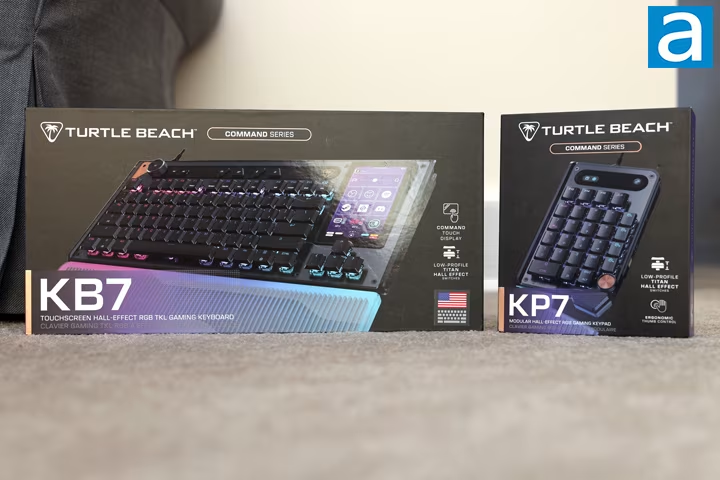
The Turtle Beach Command Series KB7 keyboard and KP7 keypad represent a new design direction for the company, departing from their previous ROCCAT Vulcan lineage. The units were evaluated at a combined price of $300.
The KB7 sells for $200 while the KP7 is priced at $100. Both are designed to connect via side rails and feature an island-style design with brushed aluminum backplates, elevated switches, and dark gray finishes with brass accents. RGB lighting illuminates keycap legends, though bottom row lighting is less consistent.
Both devices utilize Hall effect magnetic switches adjustable between 0.1mm and 3.2mm actuation points, offering a rated lifespan of 100 million keystrokes, full key rollover, and an 8000Hz polling rate. Comfortable rubberized palm rests are included alongside adjustable double kickstands.
A notable addition is a 4.3-inch color touchscreen integrated into the KB7, providing three swipeable menu pages: a standard nine-key layout, number pad, and shortcuts, plus a dedicated volume/per-app audio page. The screen is customizable through the Swarm II software.
The software offers features such as actuation point adjustment, Turtle Beach’s SOCD solution called ReacTap, rapid trigger, macro recording, key remapping, and lighting customization. Swarm II is an 82.2MB download, but experienced input delays during testing when changes were applied.
Typing feel was described as ‘good but unremarkable,’ characterized by smooth switch presses with a clacky, hollow sound signature, particularly around stabilized keys. Bottoming out felt crude rather than satisfying.
The Command Series includes an extra row of four triangular macro buttons above the function row.
Usability issues centered around the modular keypad design. The KP7 can be mounted on either side of the KB7 via rails, resulting in a lack of a single ideal placement. The keypad’s gaming-mode button layout is designed for left-hand use when attached to the right side of the keyboard.
Switching the KP7’s mounting position causes the keyboard to stop functioning entirely. Additional reliability problems included slow startup times, keys or the volume knob occasionally sticking, often requiring a full keyboard restart.
The touchscreen’s non-physical nature means users lose reliance on muscle memory for common functions like Insert or Delete.
A top media bar includes a volume knob mapped unexpectedly to Play/Pause instead of mute alongside Previous/Next Track buttons and four stiff, plasticky triangle buttons for Game Mode, profile cycling, mic mute, and backlight toggling – the mic mute function only works with Swarm II actively running.