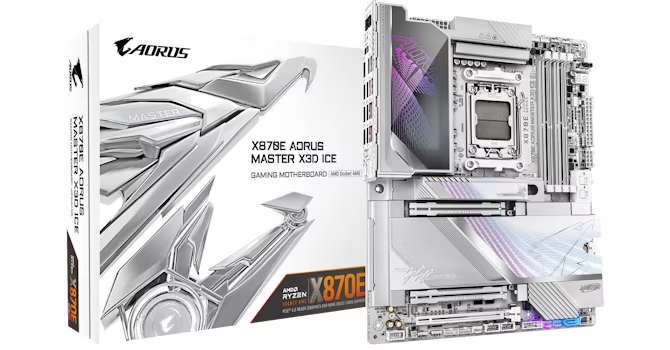
Gigabyte’s X3D Ice motherboards are presented as attractive options for AMD Ryzen owners, specifically featuring the X870E chipset range.
The flagship board under consideration is the X870E Aorus Master X3D Ice, which is noted to feature several enhancements compared to the X870E Aorus Pro X3D Ice reviewed previously. This difference in price requires the Master model to justify its premium over the cheaper option, given that both share core benefits like the X870E chipset.
Core features shared by both boards include power delivery, a 512 Mbit (64 MB) BIOS, Wi-Fi 7, PCIe Gen 5 M.2 and PCIe slots, and 65 W power delivery via the front panel Type-C header.
The X870E Aorus Master X3D Ice is recommended if users value features such as 10 Gbps Ethernet, elaborate RGB lighting, dual PCIe Gen 5 x16 slots, and increased USB bandwidth. In performance tests, the master board was solid in most areas, with only a few benchmarks noting results that were slower than expected compared to recent BIOS tweaks on other boards.
The X870E Aorus Master X3D Ice is significantly cheaper than both the ASUS ROG Crosshair X870E Dark Hero and the MSI MEG X870E Ace Max. All three represent high-end options from their respective manufacturers, with only extreme high-end models surpassing them.
Despite its lower cost compared to competitors, Gigabyte maintained premium features on the Aorus Master X3D Ice, including 10 Gbps Ethernet and dual PCIe Gen 5 M.2 ports. Additional touches include full underside SSD cooling, tool-free heatsinks, dual GPU release buttons, a Type-C header with 65 W power delivery, up to 11 fan headers, memory cooling fans, extensive RGB lighting, and an HDMI port on the PCB for case displays.
However, the Aorus Master X3D Ice has limitations compared to rivals, such as having only seven rear USB ports and two SATA ports. Its EFI and software are also described as inferior to those from ASUS and MSI.
When considering models in the $600-$800 price bracket, Gigabyte is at a disadvantage because it lacks options in this space. The older X870E Aorus Xtreme AI Top costs $800, while the newer X3D model exceeds $1,000.
For more affordable alternatives, two categories exist. One involves older motherboards, such as the ASUS Crosshair X870E Hero. This model lacks 10 Gbps Ethernet and has limited fan headers (just 12 W/1 A). Another is the X870E Aorus Master’s predecessor, which saves $100 but lacks 10 Gbps Ethernet and only has half the Type-C ports on the rear panel.
If seeking an affordable way to obtain 10 Gbps Ethernet, the ASUS ProArt X870E-Creator Wi-Fi is suggested at under $500, though it is noted as being far less impressive overall.
Ultimately, the Gigabyte X870E Aorus Master X3D Ice’s main competition comes from its own product line due to its favorable pricing. The primary alternative identified is the X870E Aorus Pro X3D Ice, which costs $150 less and offers more SATA and USB ports. While the Master model packs a greater punch in specifications, the added cost premium for the Master board is not considered justified.
The X870E Aorus Pro X3D Ice is recommended as one of the best options below $450 due to its superior feature set compared to alternatives at similar price points. Nevertheless, if the user requires the extra features of 10 Gbps Ethernet or advanced visual prowess, the X870E Aorus Master X3D Ice remains a strong purchase despite its cost.