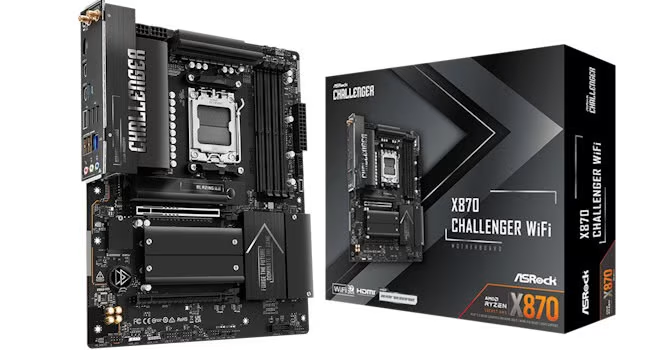
The ASRock X870 Challenger Wi-Fi is presented as a budget-friendly ATX motherboard for AMD’s socket AM5 platform. Priced at $170 and built around the X870 chipset, it provides modern features including PCIe Gen 5 support for both graphics cards and SSDs, integrated USB4, Wi‑Fi 7, and a 512 Mbit (64 MB) BIOS.
These features make the board an appealing choice for cost-conscious enthusiasts who desire up-to-date connectivity without incurring high costs. The review noted that the board performs well in thermal aspects, showing excellent SSD cooling and decent VRM cooling. Furthermore, it supports four M.2 ports for storage expansion, one of which supports PCIe Gen 5, complemented by good fan header power delivery.
The power delivery system is considered more than adequate for most builds, and its build quality is solid, featuring an 8‑layer server‑grade PCB material with no noticeable flex. However, the low price point necessitates several compromises within the design and functionality of the X870 Challenger Wi-Fi.
Several drawbacks include dated EFI and software that reportedly lack modern features, potentially disappointing users accustomed to more polished interfaces. For audiophiles, the audio subsystem uses the aging ALC897 codec. Traditional storage expansion is limited by the board offering only two SATA ports. Connectivity also presents significant limitations; the Type‑C front panel header is merely USB 3.0 and lacks enhanced power delivery.
Furthermore, not all M.2 ports feature four PCIe lanes. A specific limitation arises with the second M.2 port sharing bandwidth with USB4, requiring users to choose between using that slot or full USB4 functionality. Expansion capabilities are further restricted by a lower PCIe slot that is only Gen 3 and provides just two PCIe lanes.
The board also lacks several premium features appreciated by enthusiasts, such as one tool‑free heatsink, no CMOS clear button, no power or reset buttons on the board, and no LED POST code display for troubleshooting. Accessories are minimal, and it does not include an enhanced GPU release mechanism, a feature commonly included by ASRock.
The review drew a direct comparison to ASRock’s own Phantom Gaming X870 Riptide Wi-Fi, which is similarly priced. Although the Phantom Gaming board does not match the Challenger Wi-Fi’s VRM and SSD thermal performance, it resolves nearly every other identified shortcoming. The Riptide offers four SATA ports instead of two, better Realtek ALC4080 audio, a USB 3.2 Gen 2 2×2 20 Gbps front panel header, more rear USB ports, and includes a thermistor probe header.
The Phantom Gaming board also provides its own RGB lighting and maintains the availability of its USB4 ports regardless of which M.2 ports are utilized. While the Riptide lacks the Challenger’s newer 512 Mbit BIOS, the review suggests that this omission is currently minor compared to the value added by the older board’s additional features.
Ultimately, due to their similar cost and the comprehensive improvements offered by the Phantom Gaming X870 Riptide Wi-Fi, the reviewer finds it very difficult to recommend the X870 Challenger Wi‑Fi. The review concludes that while the Challenger Wi-Fi offers solid fundamentals and modern connectivity at a $170 price point, its performance is overshadowed by the company’s own Phantom Gaming offering. For users seeking additional features or better power delivery, alternative options are suggested, including stepping up to more expensive models like the MSI MAG X870E Tomahawk Wi-Fi.