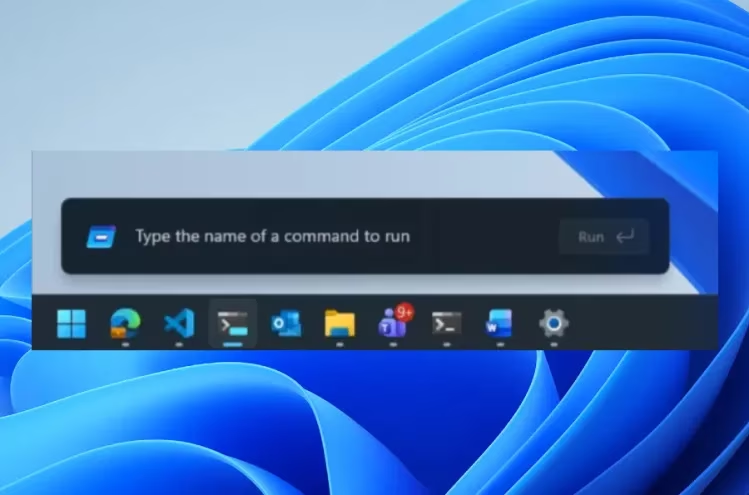
Microsoft is currently conducting tests for a significantly refreshed version of the Windows 11 Run menu. This updated Run menu introduces a modern interface for users. The company states that this new interface offers enhanced speed.
A key addition to the redesign is full support for dark mode, a feature often requested by users. The rollout of this redesigned Run menu is presently underway for Windows 11 Insiders. It is specifically being made available within the new Experimental Channel.
In a recent blog post, Microsoft detailed the various changes implemented with this refresh. One notable alteration is the decision to remove the Run menu’s “Browse” button. This button previously served as a shortcut to user files.
Microsoft indicated that the “Browse” button was removed due to what it found to be “very low usage.” In its place, Microsoft has incorporated support for a new command: “~”. Executing this command now directly leads to the user’s main directory.
The development of the new Run menu utilized code from Command Palette. Command Palette is a known utility accessible through PowerToys. This utility enables users to quickly execute commands, open websites, and search for files, among other functions.
Windows 11 Insiders interested in trying the new Run menu can enable it by navigating to Settings. From there, they should proceed to System, then Advanced, and finally turn the option on. An earlier iteration of the redesigned Run menu had already made an appearance in preview builds during the previous year.
Microsoft’s blog post highlighted collaborative efforts, stating, “We’ve collaborated tightly with partners across the platform to get these UI surfaces loading snappy.”
Further, the company claimed, “Improvements we’ve made to the platform don’t just make Run fast, but they help make the whole OS more efficient.”