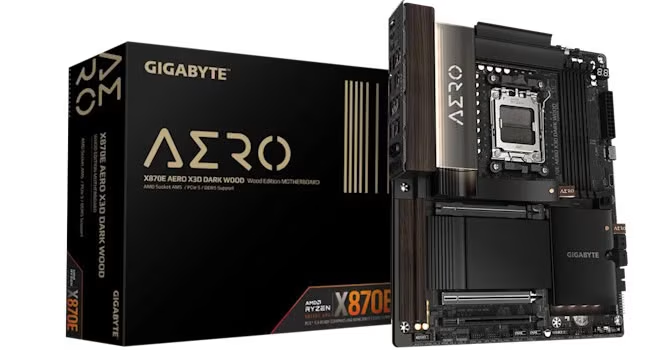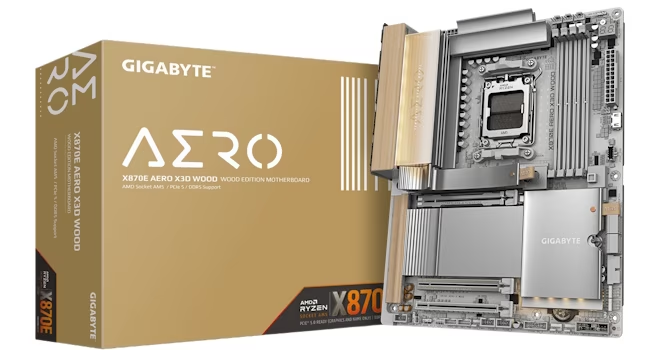
The Gigabyte X870E Aero X3D Wood features a distinctive aesthetic, incorporating light wood veneer with stunning silvery gun metal heatsinks. This visual design is noted as a standout feature, especially considering its price point of less than $500. The board’s technical specifications include automatically adjusting M.2 heatsinks, a doubled BIOS size, and bandwidth tweaks designed to prevent PCIe lane theft from the GPU.
Performance and cooling are strong points, with the board reportedly keeping its VRMs and SSDs cool, achieving some of the best observed temperatures. This performance is partly attributed to features like a large backplate and M.2 EZ-Flex, which simplifies SSD installation. Benchmarks have shown excellent results, particularly concerning memory timings, leading to high scores in both gaming and memory bandwidth.
In terms of connectivity, the X870E Aero X3D Wood is equipped with Wi-Fi 7 and dual PCIe Gen 5 M.2 ports, along with a tweaked bandwidth sharing configuration that protects the GPU’s PCIe lanes. Functional features include tool-free M.2 heatsinks, and various utility buttons such as power, reset, CMOS clear, and USB BIOS flashback. Additional features include an LED POST code display and a dedicated PCB-mounted HDMI port for case displays.
However, the board presents several drawbacks when compared to competing models. Issues include the second PCIe Gen 5 M.2 port lacking underside cooling, a feature present on the cheaper X870E Aorus Pro X3D Ice. Additionally, the top M.2 heatsink was reported to be difficult to remove and install. The firmware and accompanying software are also noted as lacking compared to competitors, making fine-tuning cooling configurations more challenging than with brands like ASUS and MSI.
Competition highlights the X870E Aorus Pro X3D Ice as the clearer alternative. This model, which costs approximately $50 less, offers superior features, including better cooling for its second PCIe Gen 5 M.2 port, 65 W power delivery over its front panel Type-C header, two additional vCore power phases, 90 A VRMs, and an extra rear Type-C port. The X870E Aorus Pro X3D Ice is deemed the better purchase considering its combination of lower cost and robust features. Other options reviewed include the ASUS ROG Strix X870E-A Gaming Wi-Fi 7 Neo and MSI’s MPG X870E Carbon Max Wi-Fi, but they are considered more expensive compared to the X870E Aorus Pro X3D Ice.
For those considering lesser chipsets, cheaper alternatives exist within Gigabyte’s range, such as the X870 Aorus Elite X3D Ice, which offers many features of the X870E Aorus Pro X3D Ice but costs $320. An even more feature-rich option is the X870E Aorus Master X3D Ice, which includes 10 Gbps Ethernet. The X870E Aero X3D Wood is summarized as offering exceptional aesthetics, while its feature set and value are less competitive when compared to similar or cheaper models.